Good Morning Sunshine ☻
Another new video ♥
I can't stop filming makeup tutorial now!! hahahaha In sha Allah I will film another new korean inspired makeup look today. CL inspired..? or maybe... Ulzzang inspired? we'll see.. hehehehe. Don't forget to subscribe to my youtube channel gais. Thanks so much love ♥
Showing posts with label tutorial. Show all posts
Showing posts with label tutorial. Show all posts
Friday, 19 August 2016
♥ Purple Love Makeup Look | Youtube ♥
Hey preeettttaaaahhh ♥
yuhuuuu!! New Video again >___<
Babe! Okay meh sy terus terang. Seyes lama x pakai eyeliner. rasa kekok betul mau pakai. Pa2 pun, hope u guys enjoy watching dis really easy and simple makeup tutorial :)
yuhuuuu!! New Video again >___<
Babe! Okay meh sy terus terang. Seyes lama x pakai eyeliner. rasa kekok betul mau pakai. Pa2 pun, hope u guys enjoy watching dis really easy and simple makeup tutorial :)
♥ Cara Mengubah Thumbnail Di YouTube ♥
Hai darlings ♥
How are you? Good?
Okay macik Pidah tk speking ompoteh hari ni. Ada tk yg baru berjinak-jinak dengan YouTube? Macik Pidah baru start suka suki dgn YouTube ni. Biasalah kan kalau baru memang banyak yg kena belajar lagi. Okay so hari ni sy nak tunjuk cara-cara mengubah thumbnail video korang.
.....................................................................................................................................
1. Step Pertama ♣
* Pastikan korang sudah "Sign In" akaun Youtube korang.
First step, click bulat-bulat kecik yang ada gambar korang tu. Yang atas sebelah kanan tu. Lepas tu click "Creator Studio".

2. Step Kedua ♣
Keluar lah macam ni nanti. Pilih video yg korang mau edit. Click "Edit"


4. Step Keempat ♣
Keluar lah windows kecik ni. Korang pilih lah gambar yg korang nk jadikan thumbnail video korang. Click ja gambar. Lepas tu "Open"

5. Step Kelima ♣
Dah selesai semua, click "Save Changes" lepas tu tunggu. Kadan-kadang lambat upload gambar tu.

6. Last Step ♣
Agak-agak dah 1 ~ 2 minit. Click "Dashboard" anddd taraaaaaa!! Siap pun. hehehhe.

♣ Senang kan step-step ni. Selamat mencuba gais!! Kalau takda "custom thumbnail" bagitau. Nanti macik Pidah ajarkan. ☻ bai.
How are you? Good?
Okay macik Pidah tk speking ompoteh hari ni. Ada tk yg baru berjinak-jinak dengan YouTube? Macik Pidah baru start suka suki dgn YouTube ni. Biasalah kan kalau baru memang banyak yg kena belajar lagi. Okay so hari ni sy nak tunjuk cara-cara mengubah thumbnail video korang.
.....................................................................................................................................
1. Step Pertama ♣
* Pastikan korang sudah "Sign In" akaun Youtube korang.
First step, click bulat-bulat kecik yang ada gambar korang tu. Yang atas sebelah kanan tu. Lepas tu click "Creator Studio".

2. Step Kedua ♣
Keluar lah macam ni nanti. Pilih video yg korang mau edit. Click "Edit"

3. Step Ketiga ♣
Click "Custom Thumbnail"

4. Step Keempat ♣
Keluar lah windows kecik ni. Korang pilih lah gambar yg korang nk jadikan thumbnail video korang. Click ja gambar. Lepas tu "Open"

5. Step Kelima ♣
Dah selesai semua, click "Save Changes" lepas tu tunggu. Kadan-kadang lambat upload gambar tu.

6. Last Step ♣
Agak-agak dah 1 ~ 2 minit. Click "Dashboard" anddd taraaaaaa!! Siap pun. hehehhe.

♣ Senang kan step-step ni. Selamat mencuba gais!! Kalau takda "custom thumbnail" bagitau. Nanti macik Pidah ajarkan. ☻ bai.
Thursday, 26 February 2015
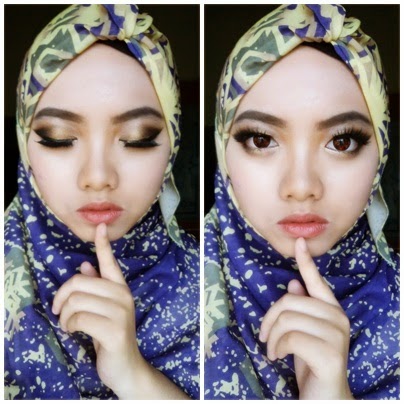
[Tutorial] Smokey eyes #3
Assalamualaikum lovely ♥ Hola
Another smokey eyes tutorial
♪ smokey eyes #1
♪ smokey eyes #2
My cute lens from my favs ig store @ulzzangeyes




Another smokey eyes tutorial
♪ smokey eyes #1
♪ smokey eyes #2
My cute lens from my favs ig store @ulzzangeyes
1. Apply brown eyeshadow
2. Dab darker brown eyeshadow - focus from the centre till the inner corner
3. Dab a metal/silver (shimmery) eyeshadow on top of the dark brown eyeshdaow and blend together with clean blending brush
4. Add black eyeshadow at the outer corner then blend again with the same brush
5. Dab yellow/gold (shimmer) eyeshadow at the centre only
6. Apply black eyeliner (thick)
Tuesday, 16 December 2014


Thursday, 11 December 2014
[Tutorial] Korean Gradient Lips
Haaaaaaaiiiiiiiiiiiiiiiiiiiiii ♥♥
Im gonna show u guys my 4 favs way to do my gradient lipsss :3 Super easy! Hope you guys like it!! If u have any makeup request, let me know on the comment box belowwww :)


Im gonna show u guys my 4 favs way to do my gradient lipsss :3 Super easy! Hope you guys like it!! If u have any makeup request, let me know on the comment box belowwww :)
1. Concealer + Lip Tint ☺
1. Dot concealer around your lips. I am using my missha under eye brightener.
2. Blend it evenly and set it with face powder. U can use finger or concealer brush but better using finger.
3. Apply ur liptint at the center of ur lips. and blend it again using your finger. Im using my peripera peri's tint no. 1
2. Lipstick + Lip Tint ☻
1. Apply your cherry lipstick or any color you want. I choose Silkygirl 07 Sunny Rose.
2. Apply ur lip tint. Make sure the color is match with the lipstick. I use essence gel tint 03 flashy apricot.
♥ This is how i do my gradient lips almost every single day ♥
3. Concealer + Lipstick ☺
1. Apply concealer. Dont forget to set with ur face powder.
2. Apply ur choices lipstick. Im using in2it pink alarm
3. Blend the lipstick using ur finger or lip brush and u are done!!
4. Lipstick + Lipstick ☻
1. Choose any NUDE lipstick. Apply all over ur lips. My choice here is essence 53 all about cupcake.
2. Apply any type of lip tint or any color u want. Im using my in2it gt 04 melon gel tint.
3. Ofcos, blend blend blend. And u are ready to go!!
And there u have it!! Hope u guys like it. If u have any question or request, please leave ur comment on the comment box below ♥
Subscribe to:
Posts (Atom)
Shopping di Watsons
Minggu lepas aku pi shopping di watsons gara-gara tengok ig story Iman Qistina. Astaghfirullahalazim. Nafsu ni. hurmmm. Tidak banyak p...

-
 Assalamualaikum warga blogger sekalian alam !! teheehe. Okay, ni kali ke-2 buat GA. Yang first dulu tu hmm, kurang sikit la org join. Tp x...
 -
 Assalamualaikum pretty ♥ **25july2015..hello GA sudah tamat ya. Pemenang sudah lama kena umum tp ada ckp sy x jujur buat GA. So please baca...
 -
 Hola ♥ Lama rasanya x buat giveaway. Sebenarnya masih takut buat giveaway. Takut terjadinya macam dulu lagi. grrrrrrr ~~ Tapi sebab rind...